IPhone 7 often restarts by itself
What causes my iPhone 7 to often restart itself with no input from user?
What causes my iPhone 7 to often restart itself with no input from user?
Hello Stew Colpitts,
Congratulations on your new iPhone 7! It's my understanding your phone has been unexpectedly restarting. I know unexpected restarting can be very concerning and impact your daily usage. I am happy to help.
Unexpected restarting can be caused by the software, content, or hardware. To test the software and content, I recommend reinstalling the iOS and setting up as new. I don't want you to lose any valuable content so it's important to back up first. This way you can retrieve your content later. Please use the links below to assist with backing up and transferring content to your computer.
About backups for iOS devices
Sync your iPhone, iPad, or iPod touch with iTunes on your computer using USB
Next follow the steps below.
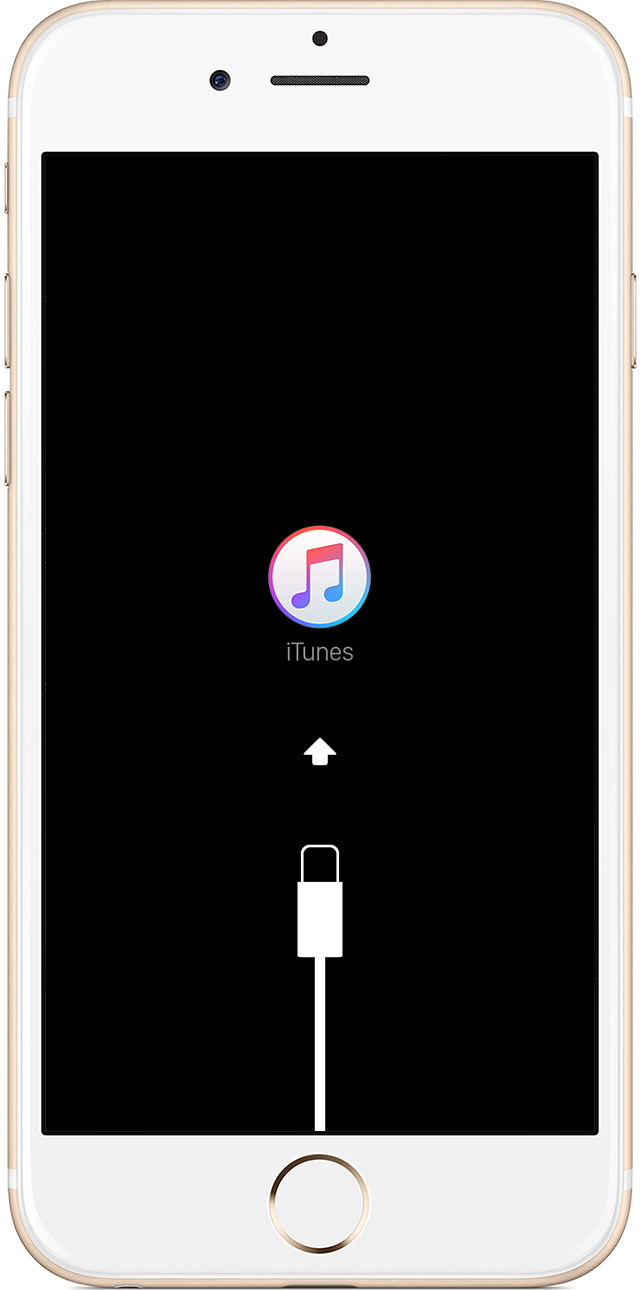
Put your device in recovery mode and set it up again
- Make sure that you're using the latest version of iTunes.
- If iTunes is already open, close it. Connect your device to your computer and open iTunes. If you don't have a computer, borrow one from a friend or go to an Apple Retail Store or Apple Authorized Service Provider for help.
- While your device is connected, force restart it with these steps:
- On an iPhone 6s and earlier, iPad, or iPod touch: Press and hold the Sleep/Wake and Home buttons at the same time. Don't release the buttons when you see the Apple logo. Keep holding both buttons until you see the recovery mode screen.
- On an iPhone 7 or iPhone 7 Plus: Press and hold the Sleep/Wake and Volume Down buttons at the same time. Don't release the buttons when you see the Apple logo. Keep holding both buttons until you see the recovery mode screen.
- When you see the option to Restore or Update, choose Update. iTunes will try to reinstall iOS without erasing your data. Wait while iTunes downloads the software for your device. If the download takes more than 15 minutes and your device exits recovery mode, let the download finish, then repeat these steps.
If you can't update or restore your iPhone, iPad, or iPod touch
Once you've successfully updated, set the phone up as new and test the issue.
- If the issue persists, you might want to contact Apple Support.
- If the issue is resolved, sync one type of content at a time back to your device. For example, if you had an issue playing music, add songs from iTunes and confirm that they will play. If your contacts weren't loading successfully, add the contacts back. After each sync, test to see if the issue has returned.
How to erase your iOS device and then set it up as a new device or restore it from backups
Thank you for using Apple Support Communities.
Hello Stew Colpitts,
Congratulations on your new iPhone 7! It's my understanding your phone has been unexpectedly restarting. I know unexpected restarting can be very concerning and impact your daily usage. I am happy to help.
Unexpected restarting can be caused by the software, content, or hardware. To test the software and content, I recommend reinstalling the iOS and setting up as new. I don't want you to lose any valuable content so it's important to back up first. This way you can retrieve your content later. Please use the links below to assist with backing up and transferring content to your computer.
About backups for iOS devices
Sync your iPhone, iPad, or iPod touch with iTunes on your computer using USB
Next follow the steps below.
Put your device in recovery mode and set it up again
- Make sure that you're using the latest version of iTunes.
- If iTunes is already open, close it. Connect your device to your computer and open iTunes. If you don't have a computer, borrow one from a friend or go to an Apple Retail Store or Apple Authorized Service Provider for help.
- While your device is connected, force restart it with these steps:
- On an iPhone 6s and earlier, iPad, or iPod touch: Press and hold the Sleep/Wake and Home buttons at the same time. Don't release the buttons when you see the Apple logo. Keep holding both buttons until you see the recovery mode screen.
- On an iPhone 7 or iPhone 7 Plus: Press and hold the Sleep/Wake and Volume Down buttons at the same time. Don't release the buttons when you see the Apple logo. Keep holding both buttons until you see the recovery mode screen.
- When you see the option to Restore or Update, choose Update. iTunes will try to reinstall iOS without erasing your data. Wait while iTunes downloads the software for your device. If the download takes more than 15 minutes and your device exits recovery mode, let the download finish, then repeat these steps.
If you can't update or restore your iPhone, iPad, or iPod touch
Once you've successfully updated, set the phone up as new and test the issue.
- If the issue persists, you might want to contact Apple Support.
- If the issue is resolved, sync one type of content at a time back to your device. For example, if you had an issue playing music, add songs from iTunes and confirm that they will play. If your contacts weren't loading successfully, add the contacts back. After each sync, test to see if the issue has returned.
How to erase your iOS device and then set it up as a new device or restore it from backups
Thank you for using Apple Support Communities.
iOS 11.2 is out now which fixes this bug.
Settings > General > Update
Also see:
November 2 "respring" Clock/Reminder restarting/overheating iPhone bug
Official update from Apple:
If your iPhone, iPad, or iPod touch unexpectedly restarts - Apple Support
Solved!
This has happened only on the iPhone 7 since the night of December 1, 2017.
Issue:
In just a matter of 20-25 seconds, the screen turns black with a loader and in 3-4 seconds, jumps back to the lock screen.
Solution which worked for me and a bunch of others at the Apple scervice care center:
Go to General, reset, then, reset all settings. Confirm your passcode and then let the phone restart. You should see your passcode gone and a default wallpaper which denotes that the reset was successful and you’re gold. The bug shouldn’t show up again.
It is fixed, in iOS 11.2 update.
Settings > General > Update
If you can't update try changing your date manually to the end of November temporarily.
You can change your date back to automatic after the update has installed fully.
Since installing 11.2.1 the issue has stopped. I haven't experienced any random restarts since yesterday. Confirmed that I was able to use all of the apps that were crashing before the update. So far, so good.
Hello,
Had the same issue that since morning today my iPhone 7Plus started restarting itself every 2 mins that made be unable to use my phone at all. Tried few steps like a hard reboot, iPhone restore but nothing worked. Called Apple support and been told to perform the below steps that resolved the issue.
1. GOTO >> Settings >> Notifications
2. GOTO individual apps and TURNOFF the notification
3. Then GOTO >> Settings >> General >> Software Update
4. Download and Install the Update
5. Then turn all the Notifications back ON
Hopefully, this should resolve the issue. Fixed mine Alhamdhulillaah.
Apple aware of the issue and working on perm fix.
Hope this helps.
Thanks,
Mohammed
My iphone7 was restarting itself randomly and I noticed upon the reboot-up, the first thing it would do is open instagram. So, I've uninstalled/ reinstalled the instagram app and have been pretty good for about an hour...no restarts
Had the same problem. Updated iOS to 11.2 and problem dissapeared. But in my opinion problem was with Viber app. As I could not open this app till I updated the iOS. Maybe, app can be random.. Hope this helps. Cheers
Hey I recently had the same problem but seeing that my iPhone 7 wasn’t updated I went and did this... I tried other things in this chat but only this worked it. It may have be a bug and was fixed by the software update.
This started happening to my iPhone 7 last night with iOS 11.2. After a reboot and hard reset didn't work, I was about to try the factory reset, but then I noticed iOS 11.2.1 was available. When I installed it, the problem stopped. Not exactly sure this was coincidence or not...but there it is. Hopefully it will help you all as well.
My iphone7 was restarting itself randomly and I noticed upon the reboot-up, the first thing it would do is open instagram. So, I've uninstalled/ reinstalled the instagram app and have been pretty good for about an hour...no restarts
(sorry for the duplicate post)
Same here, When the battery is full no problem happen, since the battery is low it restarts until I full the battery again, took to Apple Store at Rome, and I`ve been told that this is a hardware issue on the motherboard and my Phone had to be replaced for 380 Euros (Iphone7 refurbished with 3 months warranty). I bought it 14 months ago in US and the warranty from US phones is just 1 year (Europe seems to be 2 years). Taking it tomorrow to an Apple Store in London to see what they say. I will be very disappointed if I have to pay 320 pounds for a refurbished iPhone7 with almost no warranty, no charger, no cable and no earphone. It going to cost almost a new iPhone 6, by the way, my iPhone 5 is still running as a champion but I gave as a gift to my nephew when I bought my Iphone7.
Update to OS 11.2 works for me
Thank you all for help
Same here, download it via iTunes and once done connect your iPhone to get the update. I am doing this right now and will keep you updated.
IPhone 7 often restarts by itself